
Back again with the Valley challenge from TryHackMe — a tidy box with a bit of everything: network analysis, web fuzzing and a little reverse engineering. Good practice and a fun warm-up.
NMAP
nmap -sC -sV -p- -T4 <ip>
PORT      STATE SERVICE VERSION
22/tcp    open  ssh     OpenSSH 8.2p1 Ubuntu 4ubuntu0.5 (Ubuntu Linux; protocol 2.0)
80/tcp    open  http    Apache httpd 2.4.41 ((Ubuntu))
| http-methods:
|_  Supported Methods: HEAD GET POST OPTIONS
|_http-server-header: Apache/2.4.41 (Ubuntu)
|_http-title: Site doesn't have a title (text/html).
37370/tcp open  ftp     vsftpd 3.0.3
MAC Address: 02:83:0C:3F:32:E9 (Unknown)
Service Info: OSs: Linux, Unix; CPE: cpe:/o:linux:linux_kernel
Nmap done: 1 IP address (1 host up) scanned in 13.70 seconds
           Raw packets sent: 65536 (2.884MB) | Rcvd: 65536 (2.621MB)
First thing I checked was the FTP service — odd port (37370) so it’s worth a look. Anonymous login was attempted but denied, so I moved on to the next sensible target (HTTP) to continue enumeration.
HTTP (80)
Gobuster didn’t reveal anything useful at the root or the usual subdirs, and there was no robots.txt or sitemap.xml. Something about the /static page kept nagging at me, so I ran Gobuster on that path specifically:
gobuster dir -u valley.thm/static -w /usr/share/wordlists/dirbuster/directory-list-2.3-medium.txt
===============================================================
Gobuster v3.6
by OJ Reeves (@TheColonial) & Christian Mehlmauer (@firefart)
===============================================================
[+] Url:                     http://valley.thm/static
[+] Method:                  GET
[+] Threads:                 10
[+] Wordlist:                /usr/share/wordlists/dirbuster/directory-list-2.3-medium.txt
[+] Negative Status codes:   404
[+] User Agent:              gobuster/3.6
[+] Timeout:                 10s
===============================================================
Starting gobuster in directory enumeration mode
===============================================================
/12                   (Status: 200) [Size: 2203486]
/11                   (Status: 200) [Size: 627909]
..
/7                    (Status: 200) [Size: 5217844]
/8                    (Status: 200) [Size: 7919631]
/00                   (Status: 200) [Size: 127]
Progress: 218275 / 218276 (100.00%)
===============================================================
Finished
===============================================================
That 00 entry looked promising — it was small, which often means a text file or a short page. Navigating to /static/00 revealed a short note from the author and a link to a login form.
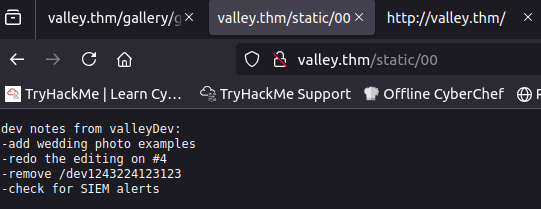
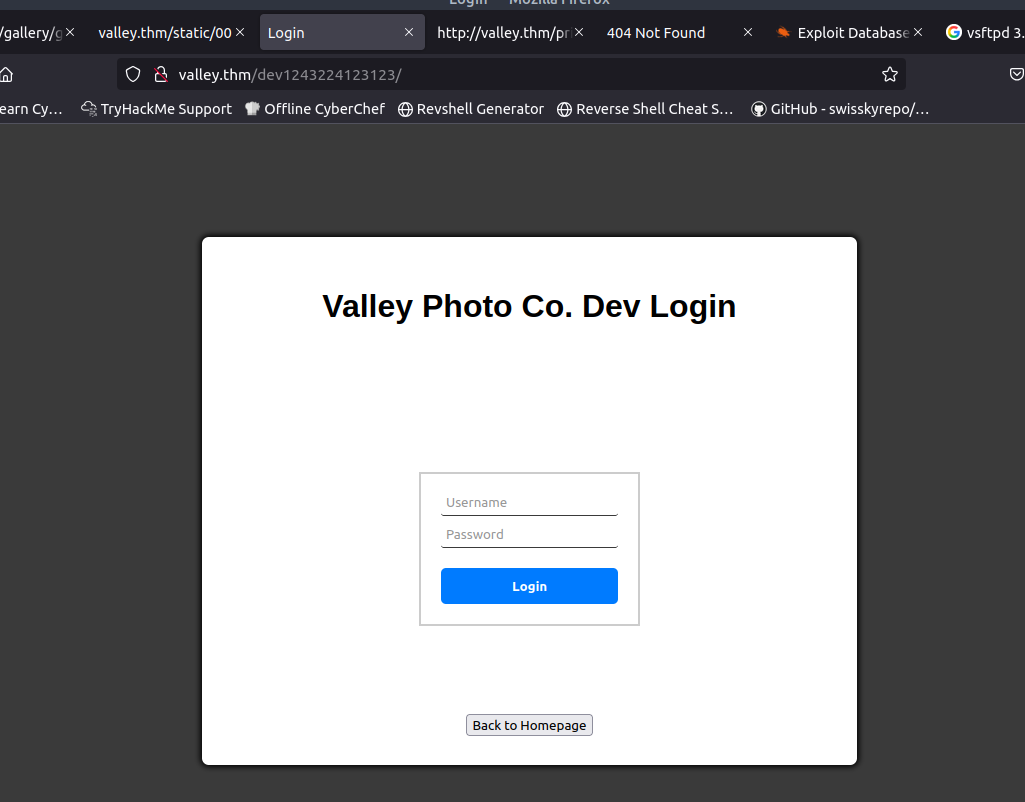
The login form didn’t behave like a normal form: submitting it in the browser produced no network request. I fired up Burp Suite to intercept the attempt and confirmed — nothing hit the server. That told me the login check is client-side (hardcoded logic in JavaScript), so the next step was to inspect the page source.
Inside the static folder there was a dev.js. Inspecting dev.js revealed the expected hardcoded credentials:
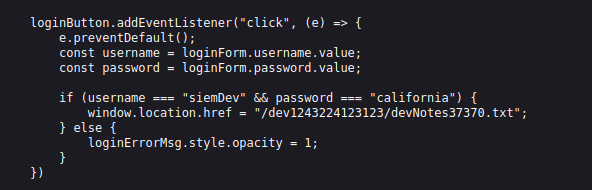
With that credential pair in hand the next clue made sense:

FTP (37370)
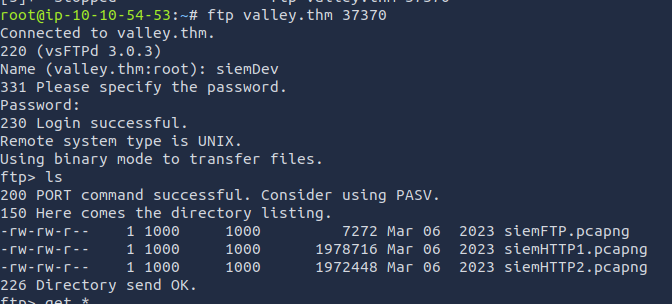
That hint pointed at credential reuse: try the same username/password on other services. The SSH creds weren’t the same, but they worked for FTP on the odd port (37370). Logging in via FTP allowed me to download three files:
Analyzing pcap files
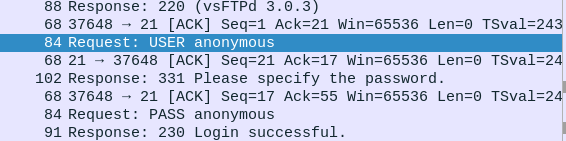
I started with siemFTP.pcapng. Right away it showed an anonymous FTP login that succeeded — somebody logged in with empty creds:
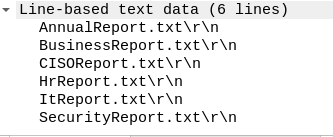
Shortly after that we can see the user listing a few files:
Next I opened siemHTTP1.pcapng and siemHTTP2.pcapng. The capture titles suggested HTTP traffic and, based on experience, I suspected a POST request might contain credentials. In Wireshark I filtered for POSTs:
http.request.method == "POST" 
That turned up a login POST that contained a password in the request body. Using that username/password allowed an SSH login later on. Always check POSTs first when you’re hunting for creds — it’s one of the first places people leak passwords.
Initial access
With the SSH creds from the pcap I logged in as a lower-privileged user and ran my usual checklist-style enumeration. Most of the obvious checks came up empty, but there was one oddity: a cron job running photosEncrypt.py every minute. The script itself didn’t appear to give us an immediate foothold.
In the user’s home directory I found an executable called valleyAuthenticator. I downloaded it and opened it in Ghidra to figure out what it did.

The binary looked packed, so I used UPX to decompress it before re-inspecting:
upx -d valleyAuthenticatorAfter unpacking and re-analyzing the binary in Ghidra I found a blob that looked suspiciously like hashed credentials:

I fed the hashes to CrackStation and got two plaintexts back:
- liberty123
- valley
Those creds gave me access to a new user valley — who, importantly, is part of a valleyAdmin group.

Privilege escalation
The valley home directory didn’t immediately reveal anything useful, so I searched for files owned by (or accessible to) the valleyAdmin group:
valley@valley:~$ find / -group valleyAdmin -type f 2>/dev/null
/usr/lib/python3.8/base64.py
That was the eureka moment. A core Python library (base64.py) was writable by a group that included valley, and the writable library is used by a script that runs as root (the photosEncrypt.py cronjob you noticed earlier). In short: a script running as root imports a module we can modify. I modified the library so that when the root-owned script imports it, my injected payload runs with root privileges:

invoke bash -p to keep the elevated permissions. After the system executed the altered library via the root cronjob, I ran:

…and I had a root shell.
Why this works (short explanation): when a root-owned process imports a module that an attacker can edit, any code in that module will execute as root. By inserting a command that gives the attacker a persistent escalation (SUID on a root shell), you can escalate to root when the vulnerable process runs. This is why writable system libraries or dependencies are a major misconfiguration.
Learning notes
Reverse engineering
- Unpack first, inspect second: try UPX → Ghidra/IDA → strings → decompiled functions.
- Focus on I/O and auth routines: look for hardcoded keys, checksum routines, and network endpoints.
- Extract any embedded hashes/credentials and test them offline (hashcat/john) before trying online.
- Keep tooling handy:
upx,ghidra,radare2,strings,binwalk.
Privilege escalation through core system files
- Check writable libraries and modules:
find / -writable -type f 2>/dev/nullandfind / -group <group> -type f. - Audit cronjobs and services that run as root — anything they import or execute is an escalation target.
- If a root process loads a modifiable dependency, you can inject code that executes as root (SUID bash, reverse shell, etc.).
PCAP analysis
- Start with obvious filters:
http.request.method == "POST",ftp,smtp— creds often show up in POST bodies or plain protocols. - Use follow-streams and export objects (HTTP, files) — they often hide config files or credentials.