
My vacation is over and I haven’t touched a computer — time to get back on (hacking) track. To work more efficiently as a budding pentester, I want to automate repetitive tasks. Today I spun up OpenVAS in VirtualBox (about 10 minutes) and ran a full scan against my home subnet. The scan took a while, but returned useful findings that helped me prioritise remediation and sharpen my tooling workflow.
OpenVAS
OpenVAS (part of the Greenbone Vulnerability Management stack) is an open-source vulnerability scanner that discovers hosts, enumerates services and compares them against a vulnerability feed to produce prioritized findings. It’s not magic — results need human triage — but it’s a great automation tool to find low-hanging misconfigurations and missing patches across a network. I used it to get a broad view of my home VLAN so I could plan remediation and deeper manual checks.
Findings
The OpenVAS scan found 20 hosts and ~50 findings (many were low severity or accepted risks). Broken down by severity:
| Severity | Count |
|---|---|
| High | 1 |
| Medium | 14 |
| Low | 35 |
The highest severity item was an SMB null-session on my main PC (scored 7.5). That’s where an anonymous connection to IPC$ (or other SMB shares) is allowed without authentication.
SMB null session (High — 7.5)
OpenVAS flagged an anonymous/null session to the IPC$ share. In simple terms, this means a remote user could connect to SMB with no credentials and query information via named pipes. According to resources like HackTricks, a null session can be used (with tools such as enum4linux) to enumerate:
- OS and host details
- Domain/NetBIOS info
- Local users and groups
- Exported SMB shares
- Some security policy information
OpenVAS captured this as a high-risk finding because it gives an attacker low-effort visibility into your host and domain configuration.
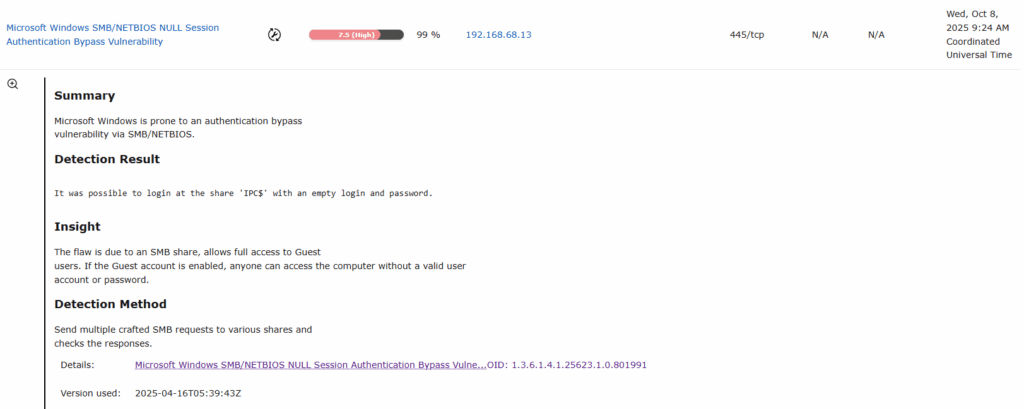
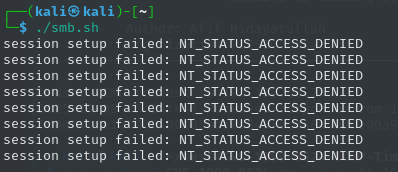
At first I didn’t even realise SMB was enabled on my main PC, so I wanted to check what an unauthenticated attacker could actually see. I whipped up a tiny script to test anonymous/null sessions against common admin shares and then ran a couple of classic enumeration tools.
Save this as smb.sh and run it only against systems you own or are authorised to test.
nano smb.sh

#!/bin/bash

ip='<TARGET-IP-HERE>'
shares=('C$' 'D$' 'ADMIN$' 'IPC$' 'PRINT$' 'FAX$' 'SYSVOL' 'NETLOGON')

for share in ${shares[*]}; do
    output=$(smbclient -U '%' -N \\\\$ip\\$share -c '')

    if [[ -z $output ]]; then
        echo "[+] creating a null session is possible for $share" # no output if command goes through, thus assuming that a session was created
    else
        echo $output # echo error message (e.g. NT_STATUS_ACCESS_DENIED or NT_STATUS_BAD_NETWORK_NAME)
    fi
done

chmod +x smb.sh
./smb.sh
What I saw:
- Most shares returned ACCESS DENIED (Windows blocking anonymous listing), which is good — those default administrative shares were protected.
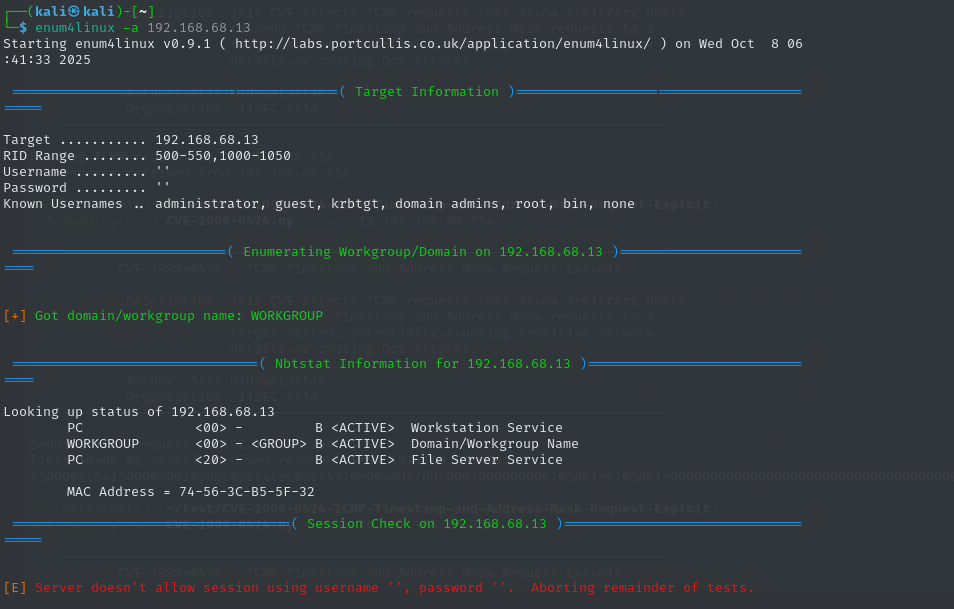
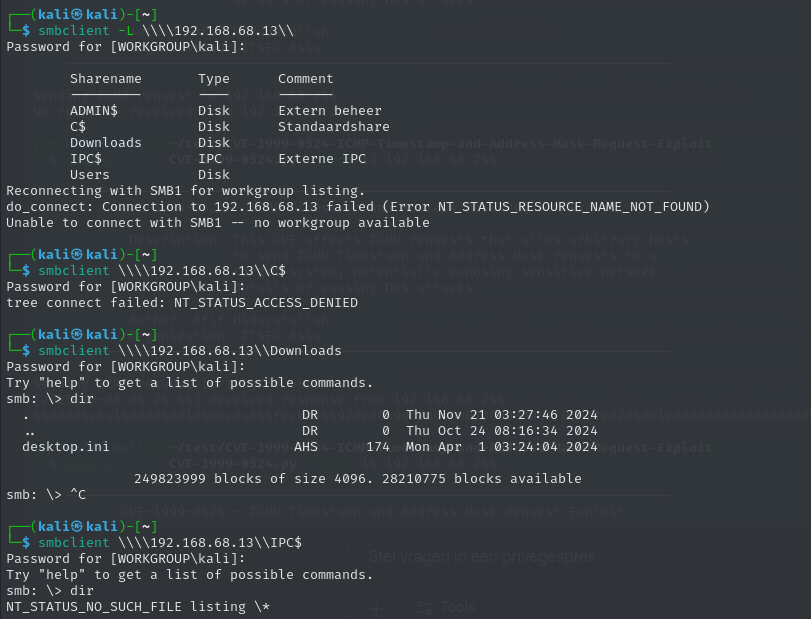
IPC$and a few other named pipes were accessible to an anonymous session in my initial OpenVAS finding, but when I tried the direct checks (smbclient,enum4linux) I got limited info — Windows had tightened up a lot by default, so the exposure was mostly informational (usernames, share names) rather than giving full filesystem access.enum4linux -a <target>andsmbclient -L //<target> -Ngave a quick view of what an anonymous user could enumerate; in my case there were some shares visible but they were mostly empty or blocked from anonymous write/read.
Some screenshots:

Remediation (what I did / what you should do)
- Patch & harden the host OS (Windows updates) and rotate any credentials if you suspect exposure.
- If you don’t need SMB on that host, disable it completely. That was my choice for this PC.
- Disable SMBv1 — it’s legacy and insecure. Microsoft documents how to detect and disable SMBv1 here:
https://learn.microsoft.com/en-us/windows-server/storage/file-server/troubleshoot/detect-enable-disable-smbv1 - Block SMB at the network level — prevent SMB (TCP 445, TCP/UDP 139, UDP 137–138) from being accessible across VLANs or from untrusted segments.
- Disable anonymous/guest access to shares and ensure shares are not exposed to Everyone/Anonymous.
- Enable SMB signing and require authentication where possible.
- Audit shares and service status regularly (use
smbclient -L,enum4linux, and scheduled OpenVAS scans).
Weak SSH algorithms allowed
While reviewing my OpenVAS scan I noticed an odd host on port 2333 that I hadn’t realised was running SSH — it turned out to be my Zigbee/Tuya gateway. OpenVAS flagged two findings:
- Weak Encryption Algorithm(s) Supported (SSH) — severity 4.3
- Weak Host Key Algorithm(s) (SSH) — severity 5.3
Both on port 2333 (Tuya’s SSH port). In short: the gateway’s SSH implementation accepts outdated/weak algorithms and a weak host key. That’s a risk because it makes passive decryption, downgrade attacks or key-forging easier if someone can intercept or target the device. The documentation of Tuya developer:
The THP23-X-D development board uses a one-device-one-key encryption scheme. You need the password before logging in. Submit a ticket to request the password by providing the SN of your THP23-X-D development board.
Tuya devices use a one-device-one-key scheme and require the vendor-supplied password (you need to open a ticket and provide the device SN to get it). There are writeups about extracting firmware and recovering such passwords via UART/serial (Hacking the Silvercrest (Lidl) Smart Home Gateway | PaulBanks.Org), but that’s invasive, may void warranty and needs downtime — not ideal for a production device.
So I went with a practical short-term mitigation, plus steps for a better long-term fix. Because I couldn’t log in to reconfigure the device and I didn’t want to risk downtime, I applied a network-level block. I blocked SSH to the device on port 2333 from all networks. becuase I use OPNsense this was relativly easy to do.
Other OpenVAS finding
Cleartext transmission of sensitive information via HTTP — 8 hits
Most of my devices serve a small web UI without a certificate. In practice this is mostly irrelevant for me because I front everything with Nginx Proxy Manager and terminate TLS there — the proxy handles HTTPS and the backend traffic is on the LAN. Still: any web UI that receives credentials or tokens should be served over TLS, even internally.
Action: Prioritise certs for services exposed to users (Let’s Encrypt via the proxy). For purely local-only endpoints consider firewalling them or adding VPN-only access.
TCP timestamps information disclosure — 19 hits
This is noisy but low-risk for my environment. TCP timestamps can leak kernel uptime and help attackers with OS fingerprinting or coarse host correlation. It’s not dramatic, but cleaning it up reduces your fingerprintable surface.
Action: Disable TCP timestamps on Linux hosts if possible (sysctl -w net.ipv4.tcp_timestamps=0) and test for side effects.
Weak MAC algorithm(s) supported (SSH) — 10 hits
This is a useful and actionable finding — several devices still accept old MACs or weak ciphers. I patched most of the devices I control, but some embedded gadgets are locked-down and still advertise weak algorithms.
Action: For devices you manage: tighten sshd configs to prefer strong MACs/ciphers/KEX (e.g. hmac-sha2-256, aes*-ctr, curve25519-sha256). For closed devices: firewall them off or isolate them on a VLAN until vendor/firmware updates are available.
What I learned
Running OpenVAS against my own network was eye-opening — and useful in three main ways:
- Automated tooling is worth the effort.
OpenVAS found things I’d miss manually. Going forward my scans will be more structured: start with a subnet discovery, then feed live targets to OpenVAS so the output is less noisy and more focused. - Blue-team skills improve red-team sense.
Hardening services (TLS, SSH algos, VLANs) taught me the practical trade-offs attackers exploit. That knowledge makes me a better pentester and makes my remediation advice more realistic for clients. - Hands-on practice matters.
Scanning my own network helped me practice triage: which findings are critical, which are informational, and which are acceptable risks for my environment. It also reinforced a simple truth — a single weak device (or default service) can weaken an otherwise solid network