
It’s been a while — I was out sick and focused on getting better — but I’m back and ready to post again. To get me warmed up I want to write about something practical and relevant: Home Assistant (HA) and how easy it is for poorly configured smart devices to leak sensitive data on a local network.
A few days ago my brother-in-law installed HA with me and he was shocked at how much the automatic discovery showed on his network — and that some devices were sending data in the clear. That inspired this short lab: a small network compromise simulation and a defensive checklist you can use to harden a home setup.
Scenario (what I simulated)
Imagine an attacker has a foothold on your LAN. That could happen via a phishing link, a compromised laptop, or a malicious guest device. From that position the attacker does basic network discovery to enumerate devices:
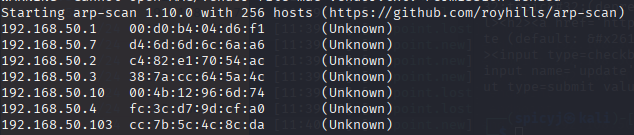
In my test the scan revealed a small web panel on X.X.50.10 and another host with a Home Assistant web UI. The HA UI looked normal, but further enumeration showed MQTT on a non-standard port (I saw it on 1833 in my case). That’s when I wanted to see whether traffic was encrypted.
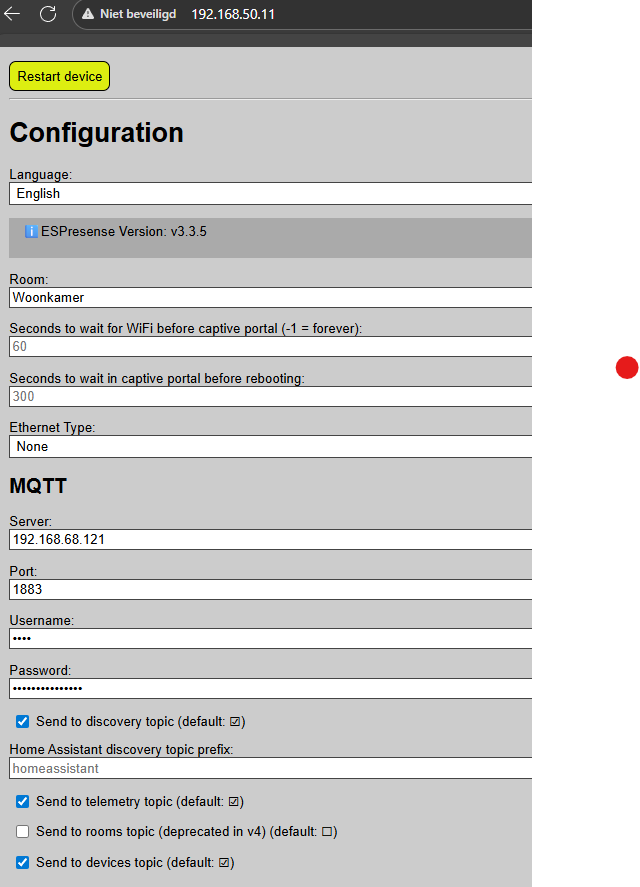
We fingerprinted the web panel and discovered another host that my arp-scan didn’t show initially. Pointing a browser at that host brought up a Home Assistant login page. A quick port scan showed an MQTT-ish service on port 1833 (non-standard, but suspicious). That’s when I decided to try a layer-2 MiTM to see if traffic (MQTT/HTTP) was being sent in the clear.
In the lab I used bettercap to perform ARP spoofing and live network sniffing.
sudo bettercap -face wlan0
arp.spoof on
net.sniff on
While the MiTM runs, open Wireshark and load the capture (or capture live). Useful filters:
- Capture filter (if you want only MQTT-ish traffic):
tcp port 1833 - Display filter for inspection in Wireshark:
mqtt(orhttpfor web traffic)
What to look for:
- Plaintext MQTT payloads (topics, message bodies) — these often leak device state, tokens or credentials.
- Plain HTTP POST/GET requests that contain tokens or session cookies.
- Any repeated auth attempts or cleartext credentials.
If the traffic is TLS-protected you’ll only see encrypted blobs — but many cheap IoT devices or misconfigured integrations don’t use TLS at all. In my lab the beacon and some messages were clearly readable, which is a fast win for post-compromise reconnaissance.
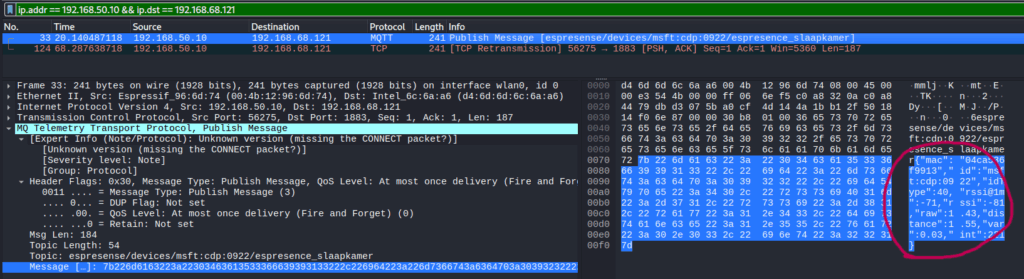
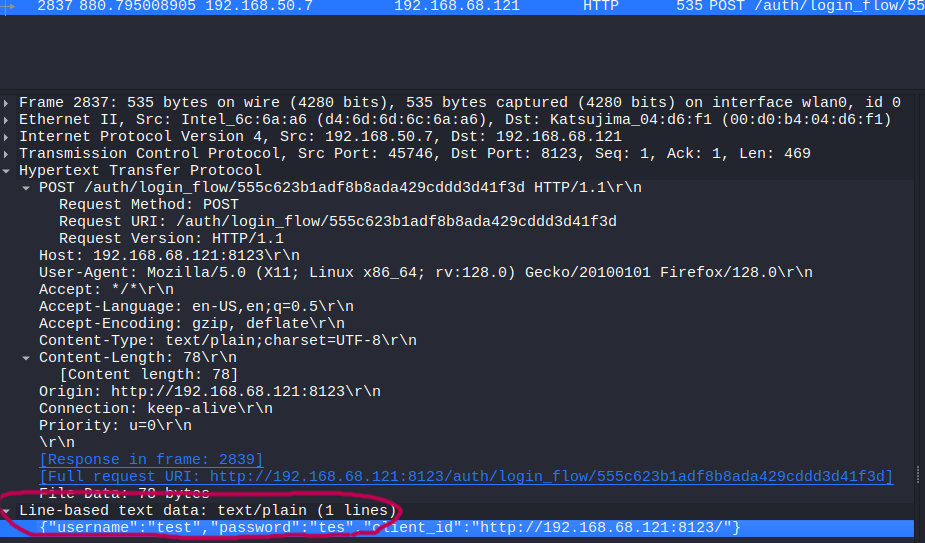
This shows messages and payloads. On my network I could see beacon updates, and — in cases where the device didn’t use TLS — even login-like payloads. That’s a clear privacy risk: usernames, tokens and device state information can leak. http will show HTTP requests if you’re testing that:
Why this matters — typical weak behaviours
A lot of smart devices — cheap Wi-Fi modules, ESP32/ESP8266 devices, older integrations — do one or more of the following:
- Use unencrypted MQTT (plain TCP) with no TLS
- Use anonymous MQTT (no username/password)
- Broadcast services (mDNS, SSDP, UPnP), leaking device names and info
- Expose an admin web UI with default or weak credentials
- Allow auto-discovery (Home Assistant’s discovery can be convenient but noisy)
- Use insecure OTA or HTTP endpoints (no certs)
If an attacker can sniff or intercept that traffic, they can learn device state, credentials, tokens, or even control some devices directly.
How to harden your smart home — practical checklist
Below are practical mitigations you can apply today. I split them between network-level & service-level.
Network-level
- Segmentation / VLANs
Put IoT devices on a separate VLAN from your laptops/phones. Block inter-VLAN traffic except to the HA server (and only to required ports). - Client isolation / private LANs
On Wi-Fi APs, enable AP/client isolation for guest networks and (where supported) for IoT SSIDs. - Use a firewall / block local discovery across networks
Block mDNS/SSDP between VLANs (unless explicitly needed). Only allow control ports to your HA server. - Disable unused broadcast services
Turn off UPnP/SSDP in routers/APs unless you need them for a specific device. - Strong Wi-Fi security
Use WPA2-Enterprise or WPA3 with strong passphrases. Avoid open networks for IoT unless absolutely necessary and isolated.
Service-level
- MQTT over TLS
- Configure your broker (e.g. Mosquitto) to listen on TLS (8883) and require client certs or at least username/password + TLS.
- Disable anonymous MQTT
- Always require credentials. Store per-device / per-integration credentials and avoid global shared accounts.
- Use TLS for HTTP endpoints (reverse proxy)
- Put Home Assistant and other web UI’s behind a reverse proxy (Nginx/Caddy) and use valid certificates from Let’s Encrypt.
- Disable or restrict HA Discovery
- Home Assistant discovery is convenient but noisy. Consider disabling discovery for integrations you don’t use or restrict it to specific devices.
- Harden devices
- Change default passwords on devices (don’t rely on default credentials)
- Keep firmware updated
- Use device-specific accounts (avoid reusing passwords)
- Use long-lived tokens wisely (rotate if possible)
- Use VPN for remote access
- Instead of exposing HA to the public internet, use a VPN to connect to your home network, or use Home Assistant Cloud (if you prefer a managed approach).
Monitoring & detection
- Enable logging and alerting in HA
Watch for unexpected connections or auth failures. - Network monitoring
Use an IDS (e.g., Suricata) or at least log unusual ARP/traffic patterns. - Regular backups
Backup HA configs and device settings
Reflection — what I learned
This was a simple purple-hat exercise for myself: knowing how attacks work is useful — not to exploit people, but to better defend them.
Key takeaways:
- Many cheap IoT devices still communicate in plaintext. The weakest device can expose data for the whole home network.
- Small configuration changes (TLS for MQTT, VLANs, reverse proxy) drastically reduce risk.
- Auto-discovery features are useful, but they increase attack surface — be deliberate about what you allow.
- Defensive testing in a lab helps you explain risks to family and colleagues in a much clearer way than purely theoretical advice.
My brother-in-law left thinking: “I had no idea my smart plugs were talking in plain text.” He implemented network segmentation and turned on TLS where possible — those two steps alone go a long way.